
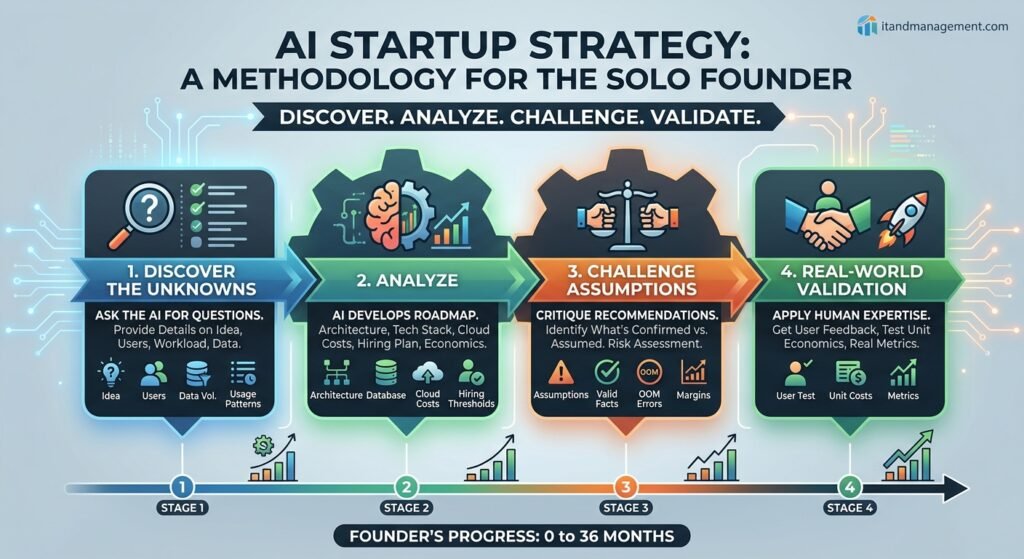
A Simple Methodology: Discover → Analyze → Challenge → Validate
AI can be an incredibly useful strategic partner for a technology startup, but there is an important lesson from this conversation with Gemini: don’t ask AI for the answer before giving it enough information to develop a good answer.
A better approach is to use a simple four-step methodology:
Discover → Analyze → Challenge → Validate
First, ask the AI what it needs to know. Answer those questions with what you know, identify what you don’t know, and then have the AI develop its recommendations. Finally, ask it to challenge its own assumptions and identify what still needs to be validated.
The Example
The way we will demonstrate this methodology is to critique a chat with Gemini that fails to follow the prescribed method. Read the chat transcript below between a tech startup founder and Google’s Gemini, then find our full analysis of the experience below for excellent take-aways with a clear context:
User: I have an idea for a web app software that I can build quickly using AI/CLI tools. What options do I have for production infrastructure and deployment?
GEMINI: Choosing the right infrastructure depends heavily on your app’s architecture (serverless vs. persistent backend, database needs, and background jobs). Modern platforms allow you to go from local code to a production HTTPS URL in minutes without managing servers manually.
Here is a breakdown of the top production deployment pathways:
Modern Platform as a Service (PaaS)
- Vercel / Netlify: Best for Next.js, Nuxt, SvelteKit, or static frontends with serverless API functions. Offers automated Git-to-deploy pipelines and global edge CDNs. (Limited execution timeouts for background workers).
- Railway / Render: Best for full-stack apps (Node, Python, Go, Docker) requiring persistent processes, WebSockets, or background workers. Deploys code or containers automatically and offers managed databases.
- Fly.io: Best for global low-latency apps and microservices. Runs lightweight micro-VMs near users across global regions via a strong CLI workflow (fly deploy).
Managed Database Services
- Relational (Postgres): Supabase, Neon (serverless Postgres with instant branching), or AWS RDS.
- NoSQL / Document: MongoDB Atlas or Firebase Firestore.
- Key-Value / Cache: Upstash (Serverless Redis) or Redis Cloud.
Infrastructure Choice Matrix
| Approach | Best Stack Fit | Pros | Cons |
| Serverless PaaS (Vercel/Netlify) | Next.js, React, Vue, Svelte | Zero server config, instant global scaling | Vendor lock-in risk, stateful/long-running jobs are tricky |
| Full-Stack PaaS (Railway/Render) | Node, Python, Go, Docker + Postgres | Simple configuration, supports WebSockets | Higher base costs when scaling persistent servers |
| Self-Hosted PaaS (Coolify / Hetzner) | Any Dockerized App | Low cost ($5–$10/mo flat), total control | You manage OS updates, backups, and security |
| Cloud Providers (AWS / GCP) | High-scale / Enterprise enterprise apps | Infinite customizability, lowest raw resource cost | Steep learning curve, heavy configuration overhead |
User: The web app will offer in-memory data integrations for multi-tenant customers. It needs massive memory capability and auto-scaling support. Customer data pipelines and configurations will be stored in a database. What are your thoughts on using AWS or Azure for this?
GEMINI: Handling in-memory data processing in a multi-tenant setup introduces specific infrastructure requirements. Because tenant datasets vary in size and memory cannot be trivially split across network boundaries mid-execution, relying solely on standard horizontal autoscaling (adding container replicas) won’t solve the problem if a single request requires 32 GB of RAM.
Core Architectural Considerations
- Stateful vs. Ephemeral Memory: If tenant data stays pinned in memory across HTTP requests, you need sticky sessions or a distributed cache like Redis. If data processing is transient, stateless processing workers are ideal.
- Tenant Isolation: Heavy in-memory operations create “noisy neighbor” risks. One tenant running a massive pipeline could trigger an Out-Of-Memory (OOM) crash that takes down other tenants sharing the instance.
Cloud Options: AWS vs. Azure
Option A: AWS Setup
- App & Processing Layer (AWS Fargate on ECS): Run serverless containers without managing VMs. Provision container tasks with up to 120 GB of RAM and auto-scale horizontally. (Alternatively, use AWS Batch for asynchronous pipelines).
- Database & Configuration Layer: Amazon Aurora PostgreSQL Serverless v2 (auto-scales storage and compute capacity instantly) paired with Amazon ElastiCache (Redis) for shared in-memory caching.
Option B: Azure Setup
- App & Processing Layer (Azure Container Apps – ACA): KEDA-driven serverless container environment with horizontal autoscaling based on memory, CPU, or queue depth. Supports Dynamic Sessions for isolated, fast-starting sandboxes per tenant.
- Database & Configuration Layer: Azure SQL Database (Serverless) or Cosmos DB paired with Azure Cache for Redis.
Recommended Strategy: Decoupled Worker Queue
Split the application into two distinct tiers:
- Lightweight Web Gateway (API/UI): Handles HTTP requests, tenant authentication, and reads configuration from PostgreSQL.
- Decoupled Worker Queue: The API posts processing jobs to a queue (e.g., AWS SQS or Azure Service Bus). Background workers pull jobs, load the dataset into memory, execute the pipeline, and flush RAM. This isolates memory crashes and enables targeted scaling.
User: I am a single developer who can build the MVP quickly and deploy it using Infrastructure as Code (IaC). I know I'll eventually need to hire a team. Can you map out a roadmap showing what I can manage solo, who/when to hire, and customer count expectations across stages?
GEMINI: As a solo developer, leaning on IaC (Terraform) and managed cloud services allows you to run the early stages alone. As customer count grows, operational drag (on-call rotations, SOC 2 compliance, tenant support) will necessitate team expansion.
Stage 1: MVP & Early Adopters (0 to 10 Tenants)
- Solo Focus: Full-stack app code, IaC scripts (AWS ECS/Azure ACA, serverless DB, message queues), CI/CD pipelines, and direct customer support.
- Hiring Strategy: 0 Hires. Keep overhead at zero while validating product-market fit.
Stage 2: Product-Market Fit & Initial Scaling (10 to 50 Tenants)
- Solo Focus: Core features, query optimization, and queue/worker scaling logic.
- Hiring Strategy (1–2 People):
- Hire #1: Full-Stack / Support Engineer (offloads daily bug fixes and baseline customer support).
- Hire #2 (Optional/Contract): Compliance & Security Specialist (assists with SOC 2 prep as enterprise prospects evaluate security).
Stage 3: Growth & Enterprise Expansion (50 to 250 Tenants)
- Solo Focus: Technical leadership, high-level architecture reviews, and technical sales.
- Hiring Strategy (4–6 People):
- Hire #3: DevOps / SRE (takes ownership of IaC, multi-region failover, high-RAM node costs, and monitoring).
- Hire #4: Customer Success Lead (owns onboarding and user retention).
- Hires #5 & #6: Senior Backend Engineers (focus on pipeline optimization, caching, and tenant isolation).
Stage 4: Scale & Operational Maturity (250+ Tenants)
- Solo Focus: Executive leadership, strategic technical roadmap, and partnerships.
- Hiring Strategy (10+ People): Specialized engineering pods, 24/7 SRE coverage, dedicated Security Engineer, Account Executives, and Support Teams.
User: How should I structure my pricing? I am thinking of a $199/month base fee with included GB quotas and clear overage fees per GB. How does this map to my costs, revenue, and profit across the roadmap stages?
GEMINI: A hybrid pricing model (Base Platform Fee + Included Allowance + Overage/GB) is ideal for data infrastructure SaaS. It ensures predictable baseline revenue while protecting your gross margins against high-RAM compute costs.
Pricing Recommendations
- Add Tiered Options: Split into tiers (e.g., Starter $99/mo, Pro $299/mo, Enterprise $799+/mo) to capture both smaller users and larger enterprise customers.
- Define the Metric: Base overages on Data Processed/Transferred through Memory, as in-memory compute is much more expensive than resting disk storage.
- Target High Gross Margins: Aim for 80%+ gross margins on base plans to absorb usage spikes before overage billing applies.
Financial Roadmap Overview
(Assumptions: ~$250–$350 Average Revenue Per User/ARPU; Cloud COGS covers high-RAM compute, DBs, queues; Headcount includes fully burdened salaries).
| Metric | Stage 1 (MVP) | Stage 2 (PMF) | Stage 3 (Growth) | Stage 4 (Scale) |
| Tenant Range | 0 – 10 | 10 – 50 | 50 – 250 | 250+ |
| Average ARPU | $250 | $250 | $300 | $350 |
| Monthly Revenue | $1,250 (5 tenants) | $7,500 (30 tenants) | $45,000 (150 tenants) | $105,000 (300 tenants) |
| Cloud Hosting (COGS) | ~$400 | ~$1,200 | ~$6,000 | ~$12,000 |
| Team / Headcount | $0 (Solo) | ~$7,500 (1 Hire) | ~$32,000 (4 Hires) | ~$65,000 (10+ Hires) |
| Total Monthly Spend | ~$700 | ~$9,500 | ~$41,000 | ~$85,000 |
| Monthly Net Profit | +$550 | (-$2,000) | +$4,000 | +$20,000 |
| Gross Margin % | ~68% | ~84% | ~86% | ~88% |
Key Financial Takeaway: Expect a temporary cash flow squeeze in Stage 2 when taking on your first full-time hire. You will need $20k–$40k in saved revenue or seed capital to bridge Stage 2 into Stage 3 profitability.
User: What does a realistic execution timeline look like for this plan?
GEMINI: For a technical solo founder building complex, multi-tenant B2B data software, a realistic execution timeline scales over 24 to 36 months:
| Phase | Stage | Timeline | Target Tenants |
|---|---|---|---|
| Phase 1 | Solo MVP | Months 0 – 6 | 0 – 10 Tenants |
| Phase 2 | Early PMF | Months 6 – 18 | 10 – 50 Tenants |
| Phase 3 | Scaling | Months 18 – 30 | 50 – 250 Tenants |
| Phase 4 | Mature Ops | Months 30 – 36+ | 250+ Tenants |
Phase Timeline & Key Milestones
- Months 0 – 6 (Stage 1: Solo Build & Beta Launch):
- Months 1–3: Write core application logic, set up IaC (Terraform) for auto-scaling containers and serverless DBs, build basic UI.
- Months 4–5: Build tenant-isolated worker queues, end-to-end testing, and Stripe integration.
- Month 6: Launch to early waitlist; land first 5–10 paying tenants (~1–2 new tenants/mo).
- Months 6 – 18 (Stage 2: PMF & First Hire):
- Months 6–9: Iterate based on beta feedback; reach ~$2.5k–$5k MRR.
- Months 10–12: Make Hire #1 (Full-Stack Support Engineer) to relieve user support strain.
- Months 12–18: Complete SOC 2 Type I audit prep; reach 50 tenants (~$12.5k MRR).
- Months 18 – 30 (Stage 3: Growth & Team Scaling):
- Months 18–22: Bring on Hire #2 (DevOps/SRE) and Hire #3 (Customer Success).
- Months 22–26: Pass SOC 2 Type II audit; roll out Enterprise Tier ($799+/mo) with dedicated RAM pools.
- Months 26–30: Add Hires #4 & #5 (Backend Engineers); scale to 150–200 tenants (~$45k–$60k MRR).
- Months 30 – 36+ (Stage 4: Scale & Enterprise Maturity):
- Build specialized sales and security pods; exceed 250 tenants ($100k+ MRR / $1.2M+ ARR).
Our Analysis
In this conversation, Gemini did a good job of taking a broad software idea and progressively turning it into an architecture, cloud strategy, hiring plan, pricing model, financial projection, and execution timeline. It identified important concepts such as tenant isolation, asynchronous processing, worker queues, and separating the application layer from resource-intensive data processing.
But as the conversation progressed, Gemini became increasingly confident about things that hadn’t actually been established. The $250–$350 ARPU, 80%+ margins, cloud costs, customer counts, hiring thresholds, and 24–36 month timeline were presented as realistic assumptions without enough information to support them.
The biggest missing piece was unit economics. For an application centered around in-memory data processing, “GB processed” may not even be the right pricing metric. RAM-hours, CPU usage, execution time, concurrency, database usage, and network costs could all affect the actual cost of serving a customer.
The problem wasn’t necessarily the recommendations—it was that the AI got ahead of the available information.
What Should the Prompt Have Asked?
Before asking AI to make recommendations, the founder could have asked:
“What questions do you need me to answer about my application’s data volume, workload, concurrency, processing time, and customer usage patterns before you can recommend an architecture?”
“What questions do you need to estimate the cloud cost of serving one typical customer and one high-usage customer?”
“What questions do you need to determine whether GB processed, RAM-hours, compute time, or another metric would make the best pricing model?”
“What questions do you need to determine when a solo founder would realistically need to hire engineering, DevOps, support, or security help?”
The founder can then answer those questions—or provide additional assumptions—and ask the AI to build the roadmap from that information.
This leads to the ITandManagement AI Strategy Prompt, our recommendation of how to structure your conversation with AI:
1. Describe the idea
“Here is my business/software idea: [describe the idea].”
2. Discover the unknowns
“Before making recommendations, ask me the questions you need answered to understand the business, users, workload, data, technology, security, and expected growth.”
3. Analyze
“Using my answers, develop a technology and business roadmap. Clearly distinguish facts I provided, assumptions you made, and areas requiring validation.”
4. Challenge
“Challenge your own recommendations. Identify the assumptions most likely to be wrong and what I should validate before investing significant time or money.”
The Takeaway
AI can now give a solo founder a remarkably sophisticated starting point for thinking through architecture, economics, staffing, and strategy—work that previously might have required multiple consultants.
But the value isn’t simply in getting answers from AI. The real advantage comes from using AI to discover the right questions, explore the possibilities, and challenge assumptions.
The final step of the methodology—Validate—happens outside the chat. Take the assumptions and recommendations from the AI conversation and test them in the real world: build a prototype, benchmark the technology, talk to potential customers, test actual cloud costs, research competitors, or put the product in front of early users. AI can help you develop the plan, but reality gets the final vote.

